Netsh is a Windows command-line tool that can help with the network configuration of a particular Windows system. Here are just some of the networking related tasks we can use Netsh for:
Finding routesViewing the firewall configurationAdding proxiesCreating port forwarding rules
This would allow us to pivot further from within the network the workstation is in.
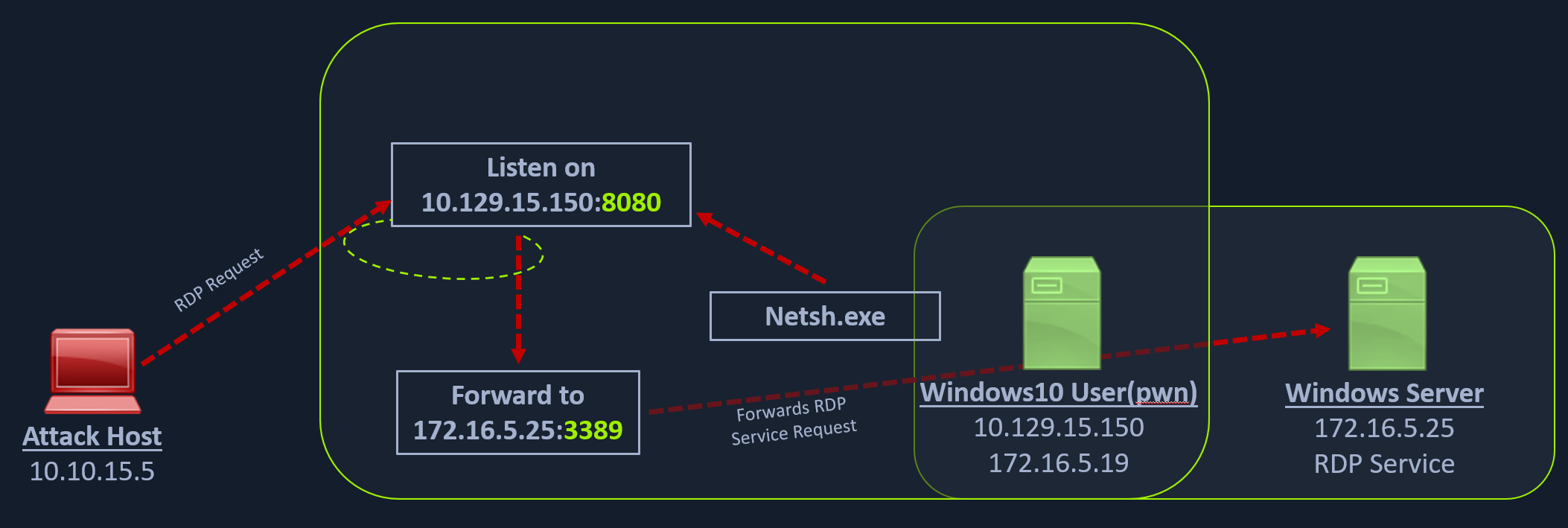
We can use netsh.exe to forward all data received on a specific port (say 8080) to a remote host on a remote port. This can be performed using the below command.
Using Netsh.exe to Port Forward
netsh.exe interface portproxy add v4tov4 listenport=8080 listenaddress=10.129.15.150 connectport=3389 connectaddress=172.16.5.25netsh.exe interface portproxy show v4tov4
Listen on ipv4: Connect to ipv4:
Address Port Address Port
--------------- ---------- --------------- ----------
10.129.15.150 8080 172.16.5.25 3389After configuring the portproxy on our Windows-based pivot host, we will try to connect to the 8080 port of this host from our attack host using xfreerdp. Once a request is sent from our attack host, the Windows host will route our traffic according to the proxy settings configured by netsh.exe.